Master data
The Memida database already includes more than 5,000 device master records. You can edit these records and add new ones. Many calibration laboratories are also already stored in the database and kept up to date.
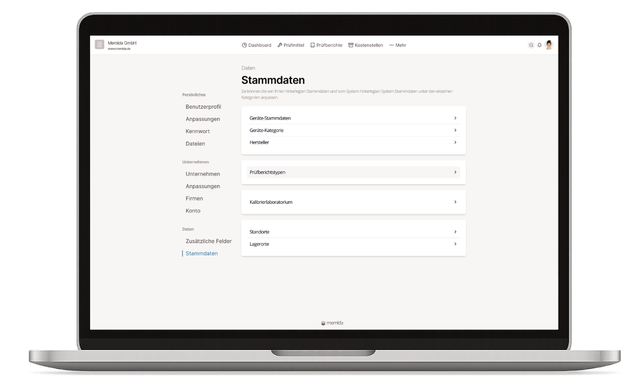
Fig. 1: Master data overview
 Fig. 2: Device master data – example: Fluke 77 Series III digital multimeter
The master data for a device consists of three elements:
- Manufacturer
- Device master data
- Device category
You can add or edit inspection equipment master data such as sites, storage locations, and calibration laboratories.
You can also add new inspection report types alongside the standard types.
For digital calibration certificate creation, manage measurement templates and calibration plans here. A measurement template defines which measured quantities and measurement points are recorded for a device master record. A calibration plan uses a specific revision of this template and adds requirements for the calibration. You can preselect the plan on the inspection equipment.
📄️ Devices
Master data for devices
📄️ Manufacturers
Here you can edit the master data of existing manufacturers or add new ones.
📄️ Device categories
Here you can edit existing device categories or add new device categories.
📄️ Sites
Master data for sites
📄️ Storage locations
Master data for storage locations
📄️ Calibration labs
Here you can edit existing calibration labs or add new ones.
📄️ Inspection report types
Master data for inspection report types
📄️ Measurement templates
Define measurement groups, units, nominal values, limits, and measurement uncertainties for calibration certificates, and manage template revisions.
📄️ Calibration plans
Create calibration plans with active measurement templates, reference devices, and technical requirements, and assign them to your inspection equipment.