Status logic
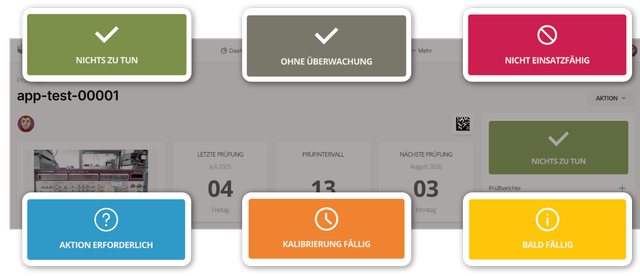
Fig. 1: Inspection equipment status
The status appears in the right column. Memida updates it automatically based on events and, in some cases, user input.
Status is shown via color, icon, and text. Possible values:
| Status | Icon | Color |
|---|---|---|
| Ready for use | Checkmark | green |
| Due soon | (i) | yellow |
| Calibration due | Clock | orange |
| Expired | Struck-through circle | red |
| Calibration requirement removed | Struck-through circle | red |
| Not ready for use | Struck-through circle | red |
| Action required | Question mark | light blue |
| Not monitored | Checkmark | gray |
Table 1: Inspection equipment status values
Status of Groups and Sets
An inspection equipment group does not have its own inspection interval status. Instead, it inherits the most critical status of its active members. Draft, archived, and deleted members are not included in this calculation.
The priority is:
- If at least one active member is not ready for use, or an active, monitored member is overdue, the group is not ready for use.
- Otherwise, the group inherits Action required if at least one active member has this status.
- In all other cases, the group is ready for use.
A group without active members is considered ready for use. The group's archive status takes precedence over status inheritance. In the group details, inherited by the group identifies the member that determines the group's current status.